Inbox & insights
Read every conversation, take over live, and turn chats into structured data.
The Inbox shows every conversation across your agents in three panes: the list, the transcript, and the details.
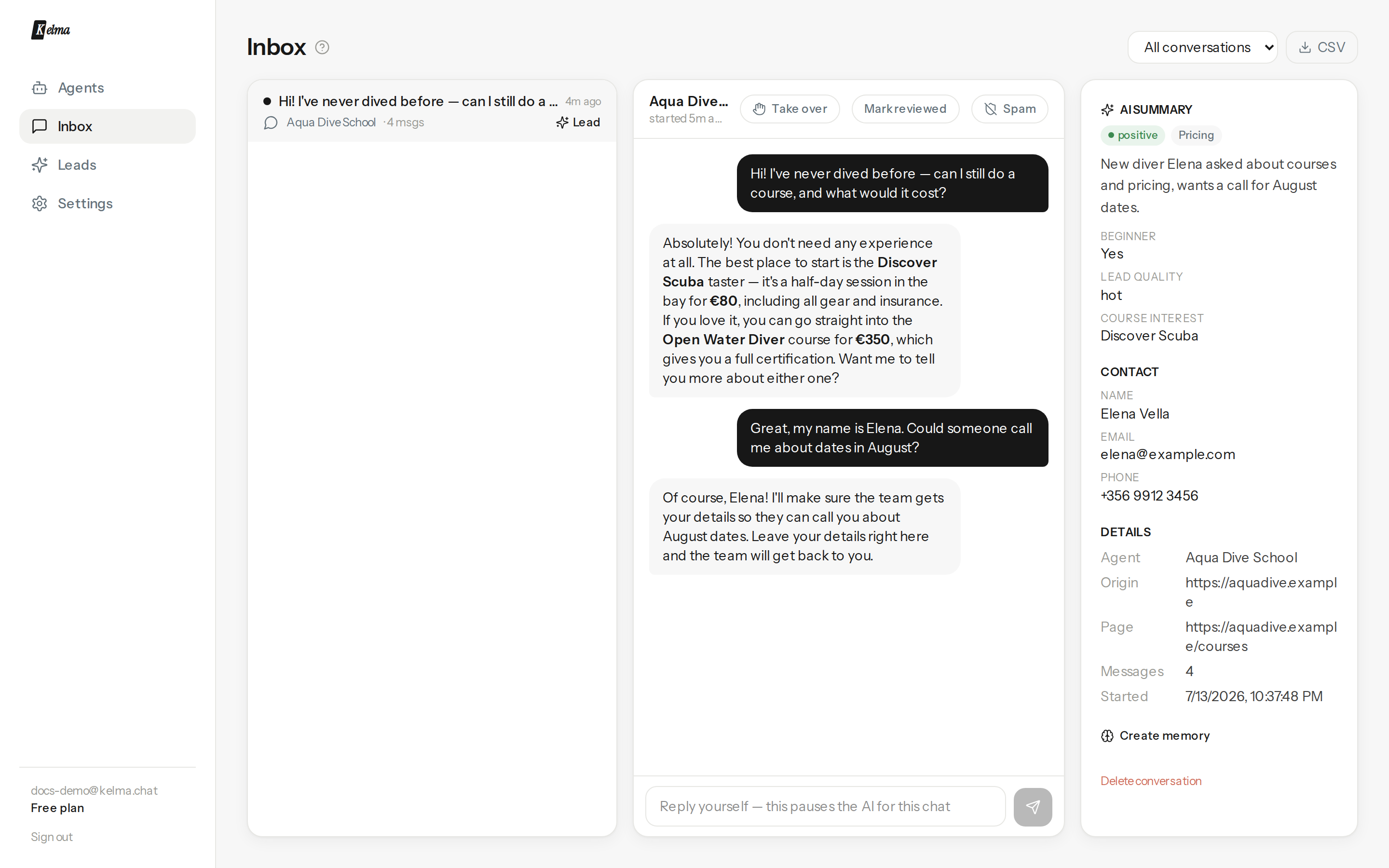
Working the list
Filter by agent or status (New, Reviewed, Spam). New conversations carry a dot; mark them reviewed as you go. Spam silences the agent for that thread — the visitor can keep typing but gets no more AI replies — and hides it from the default view. Everything is reversible.
Take over from the AI
Type in the reply box and send: the AI pauses for that conversation and the visitor sees your message appear live, marked as from the team. Press Hand back to AI when you're done. (An urgent-handoff request from the visitor pauses the AI automatically and pings your alerts.)
AI summary & custom extraction
Each conversation gets a sentiment, an intent, and a one-line summary. Add your own extraction fields on the agent's General tab — e.g. Lead quality: hot / warm / cold, Demo requested: yes/no, Budget: number — and the AI fills them for every conversation. They show in the details pane and in exports.
Teach from a conversation
Spot a reply you'd phrase differently? Create memory in the details pane — see Memories.
Export
The CSV button downloads all conversations with their analysis (including your custom fields) for spreadsheets or BI. Leads have their own export on the Leads page.