Build your agent
Agent setup
Name, persona, answer style, and the behaviour switches that shape every reply.
Everything on the General tab shapes how your agent introduces itself and speaks.
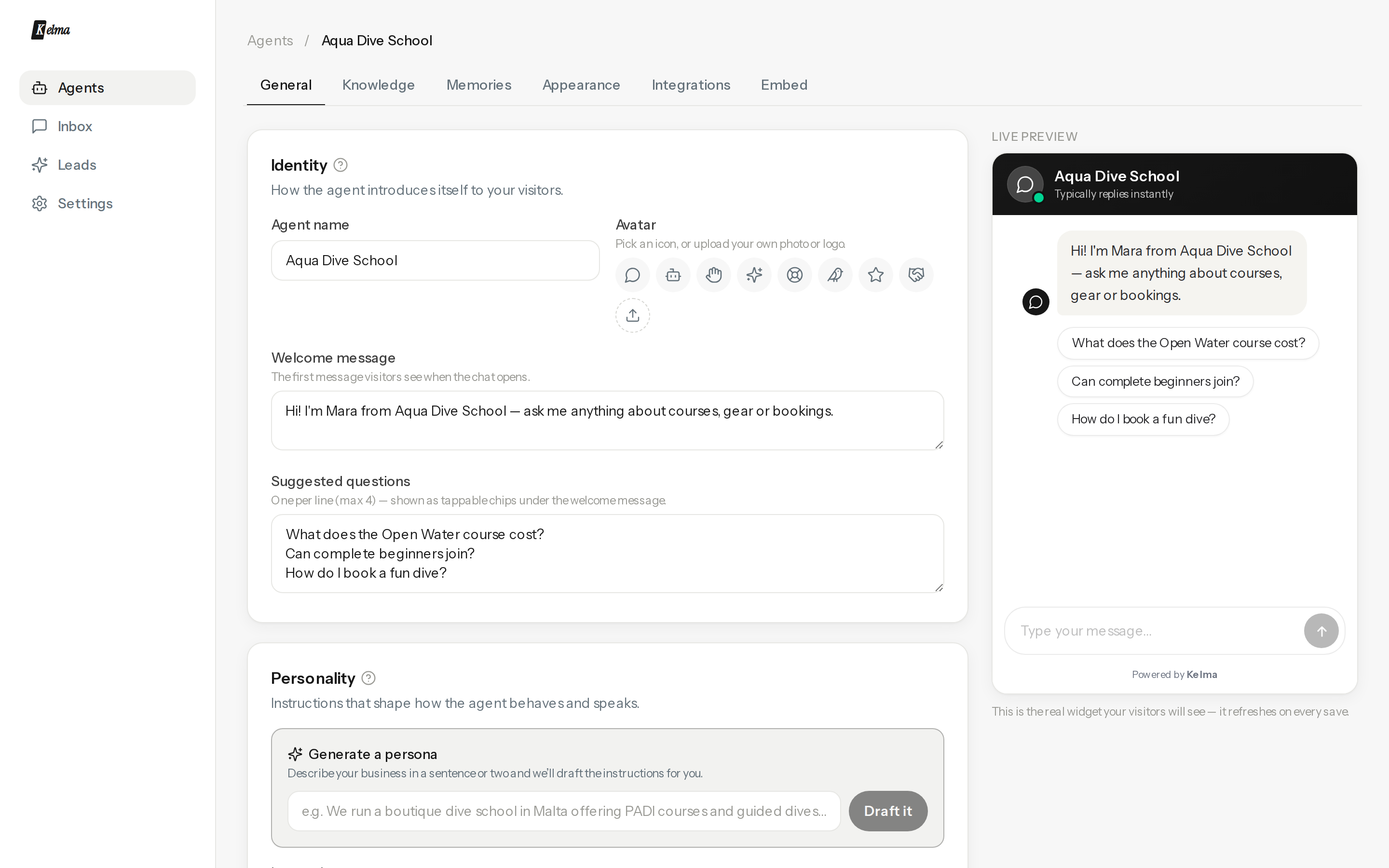
Identity
- Agent name — shown in the chat header and used when the agent introduces itself.
- Avatar — pick an icon or upload your own logo/photo (cropped to a circle automatically).
- Welcome message — the first message visitors see when the chat opens.
- Suggested questions — up to four tappable chips shown under the welcome message. Use the questions customers actually ask.
Personality
Describe your business in a sentence and press Draft it — Kelma writes the persona instructions for you. Edit them freely afterwards; this is the agent's system prompt.
- Answer style — Concise keeps every reply to a couple of sentences; Balanced (recommended) stays short but expands into organised, link-citing bullet lists when a visitor asks for an overview ("what are all your services?"); Detailed leads with structure for knowledge-heavy sites.
- Only answer from the knowledge base — when on, the agent says it doesn't know rather than guessing beyond your content. Recommended for factual accuracy.
- Allow emojis — a tasteful maximum of one per message.
- Creativity — lower is precise and consistent; higher is warmer and more varied. Start low for support agents.
Data extraction
Define fields the inbox AI should pull out of every conversation — see Inbox & insights.